Search This Blog

Saturday, 13 July 2013

HOW TO REPAIR A BRICKED ANDROID PHONE

First of all, lets get something straight. Most people use the term "bricked" improperly. A bricked phone means one thing: your phone won't turn on in any way, shape or form, and there's nothing you can do to fix it. It is, for all intents and purposes, as useful as a brick. A phone stuck in a boot loop is not bricked, nor is a phone that boots straight into recovery mode. These are things you can usually fix, and they're a lot more common than a truly bricked phone. If your phone is actually bricked, you won't be able to fix it yourself (but there are things you can do—see the end of this article). For those other problems, you have a few options.

If Your Phone Keeps Rebooting: Wipe Your Data and Cache

How Do I Fix My Bricked Android Phone?
If you've flashed a ROM and your phone won't boot into the home screen, it's probably because you forgot to wipe your data and/or cache. It's trying to boot into the ROM, but some leftover data from your last ROM is causing it to error out, and it'll reboot itself over and over again. If your phone's eating a big bowl of boot loops, your first course of action should be to wipe its data and cache, which you can do from recovery mode. This method assumes you're using ClockworkMod Recovery, like the majority of Android users, but if your particular phone uses a different third-party recovery (like AmonRA), you should still be able to find these options in the interface. They might just be in a different place. To wipe your data and cache:
  1. Power down your phone. Turn it back on and boot into Recovery mode. This is a bit different for every phone, so you'll have to Google how to do it for your specific model. Usually it involves holding down another button, like Volume Down, as you turn your phone on. HTC phones will have to then select "Recovery" from a menu, while other phones will boot directly into ClockworkMod. You'll know you're in ClockworkMod by the words "ClockworkMod Recovery" at the top of the screen.
  2. Use your volume keys to navigate the menus, and your power button to select menu items. Scroll down to Advanced, and choose "Wipe Dalvik Cache". When that's finished, go back to the main screen and choose "Wipe Cache Partition". Lastly, head to "Wipe Data/Factory Reset". This will delete all your settings and apps, but you should still be using the correct ROM.
  3. Reboot your phone.
With any luck, it should boot right into your ROM. If that didn't work, try the below method with the same ROM (or with a different ROM) and see if you get different results.

If Your Phone Boots Straight Into Recovery: Flash a New ROM

How Do I Fix My Bricked Android Phone?
If, when you boot up your phone, it goes straight into ClockworkMod, then there's likely an issue with the ROM you flashed. Note that some ROMs boot into recovery mode automatically after flashing, so reboot your phone once from recovery mode to make sure you're having a problem. HTC users: if you boot up your phone, it might go straight into the bootloader—check to see whether you can choose "Recovery" from the list before continuing to the next step. HTC phones usually don't boot straight into recovery.
In this case, you'll want to reflash the ROM from scratch. Try again with the ROM that messed up your phone, if you so choose, but if that doesn't work, try an entirely different ROM. The best way to do this is to download a ROM from somewhere on the net and putting it on yourSD card. You'll need to take the SD card out of your phone, and you'll need an SD card reader that you can plug into your computer. Here's how it works:
  1. Plug the SD card into your computer. Drag the ROM's ZIP file to your SD card, and wait for it to copy.
  2. When it's done copying, eject the SD card and put it back in your phone. Reboot into Recovery mode. This is a bit different for every phone, so you'll have to Google how to do it for your specific model. Usually it involves holding down another button, like Volume Down, as you turn your phone on. HTC phones will have to then select "Recovery" from a menu, while other phones will boot directly into ClockworkMod. You'll know you're in ClockworkMod by the words "ClockworkMod Recovery" at the top of the screen.
  3. Use your volume keys to navigate the menus, and your power button to select menu items. Scroll down to "Install ZIP From SD Card" and navigate to the ZIP file you just copied over. Give it time to flash the ROM.
  4. When it's done, reboot your phone.
Hopefully, your phone should successfully boot into the new ROM. From there, you can probably assume that the previous ROM that messed up your phone isn't going to work, and you'll have to find another ROM for now—or find another copy of that ROM that isn't corrupted. Remember to make backups of your working ROMs so you don't lose all your data!

If Your Phone Boots Straight Into its Bootloader: Restore From a Stock ROM

If you're really having trouble, one of the most surefire ways to get your phone working again is to restore from the original ROM your phone came with—unrooted, stock, stable goodness. Each manufacturer and phone has a different method for doing this, and we can't go into too much detail here, but we can steer you in the right direction.
Note that this will unroot your phone, and return it to exactly how it was when you bought it from the store. You'll lose all your apps, settings, ClockworkMod recovery, you'll get over-the-air updates again, and you'll even have to re-activate your phone if you're on a CDMA provider like Verizon or Sprint.
How Do I Fix My Bricked Android Phone?
For Motorola Phones: If you have a Motorola phone, you'll need to use RSD Lite, the program that Motorola and its partnered carriers use to restore almost-bricked phones. We've actually run through how to use RSD Lite before, so check out step one of our original rooting guide to restore your phone to its original factory ROM. RSD Lite isn't exactly an official program open to the public, so you'll have to Google around to find a version that works for you. You'll also need an SBF file for your device, which is the original stock ROM that RSD Lite will flash to your phone. Google for this as well. RSD Lite only runs on Windows, so if you're a Mac or Linux user, you'll need a Windows partition or a friend with a Windows machine to help you out.
For HTC Phones: HTC phones can flash stock ROMs, known as RUUs, right from the phone's bootloader. You'll need to Google around for your device's specific RUU file, but once you download it, save the ZIP file to your SD card, and rename it (to something like PG05IMG.zip—the download page for the RUU file should specify which filename is required), booting up your phone should automatically flash the stock ROM from HBOOT, HTC's bootloader. Check out the video at the left to see an example of this on the HTC Thunderbolt.
For Samsung Phones: If you're using a Samsung Galaxy phone, you can use a tool called Odin to reflash an OPS file, which is a stock ROM that will return your phone to factory settings. You'll need a Windows machine and a copy of Odin, which you can find by Googling around the net (as its not an official tool). Check out the video to the left to see an example of Odin, and check out The Unlockr's guide to using Odin to familiarize yourself. You may need to Google around for your specific device's OPS file and instructions.

If You Get Errors with Any of The Above Methods: Reformat Your SD Card and Don't Give Up

This is less likely, but it's a problem I and a few others have run into on occasion: sometimes your SD card just gets corrupted, which makes the above methods useless (since they rely on your SD card to work). Take your SD card out of your phone, put it into your computer using an SD card reader, and format it. It's very important that you format it through an SD card reader directly and not by plugging in your phone in USB mode—I learned this the hard way. Format it as FAT32 and try the above methods again.
Other errors, like during the ROM flashing process, might give you a hint as to what's wrong. Try heading to the XDA Developers forums and asking for help, as your phone could have one of a million specific problems we can't address here today. Remember, if your phone turns on, there's still a good chance you can recover from whatever error you're experiencing, so don't give up just yet!

If Your Phone Is Truly Bricked: Take It Into the Store and Play Dumb

If your phone is actually bricked—that is, it won't turn on at all, no matter how hard you try—it's time to give up and move on. The first thing you can do in this situation is try to take it back to your carrier's store and play dumb—just say something like "I don't know what happened, but my phone won't turn on anymore" (don't tell them you rooted it, obviously). Most carriers don't have time to deal with such issues and they'll just give you a new phone. Sure, it's a tad evil, but it should work most of the time.
If they're wise to your act, though, you can try another store or just sell your bricked phone for a few bucks on Craigslist. Sadly, if no one will replace your phone, you'll have to buy an entirely new one. Such are the dangers of rooting, but don't be discouraged! Bricking your phone is pretty rare, so I wouldn't worry about it being a common occurrence. As always, though, when you void your warranty, only do so if you're ready to replace that device completely, since you never know what can happen.

Wednesday, 3 July 2013

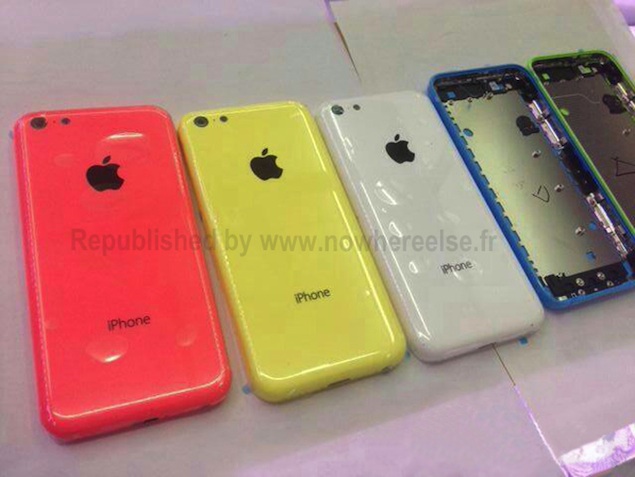
New pictures of purported low-cost iPhone's back shell show a Blue variant

New higher quality images of the purported back case of the low-cost iPhone have surfaced online, adding a Blue colour shell.

The images that appeared on French website, Nowhereelse.fr reveal back shells that sport a glossy finish and include metal contacts/ attachment points for connecting components.

It appears that they're final production units as evident from the plastic covering they're wrapped in. However, the images do not reveal any new details and match the ones that surfaced a few days back barring that they also feature a new Blue shell in addition to the Red, Green and Yellow shells depicted in the previous image.

As apparent, the back shells sports a black Apple logo, a round hole for the camera lens, another one for the flash and a hole for the noise cancellation microphone. As previously noted, the internal panel sports contacts/ attachment points that can connect to components such as the motherboard and Lightning connector port at almost exactly the same points where they're positioned on the iPhone 5.

Another picture of the rear shell that appeared in April, shared by case manufacturer Tactus, matches these shells in terms of the overall design, including the position of the camera lens, microphone and flash holes, though it was White in colour. The case maker had said that the cheaper iPhone would be available in Black, White, Blue, Red and Yellow colours, citing the 'factory producing this secretive project' as a source. Tactus had informed that the actual phone might be around 9mm thick, 120mm in height and around 62-65mm in width, making it both taller and wider than the iPhone 4 and 4S.

Apple focused Japanese blog Macotakara had also suggested that the new low-cost iPhone will come in multiple colours. It cited two sources that suggested different colours for the purported budget iPhone. While one source mentioned that it would come in Navy, Gold Orange, White, and Grey colours, the second one suggested White, Pink, Green, Blue, and Yellow-Orange colours. The mockup offered by the site also featured the same design elements and positioning of components, though the colours were a bit different.

KGI Securities analyst Ming-Chi Kuo had also confirmed in one of his research reports a plastic shell for the budget iPhone and had said that Apple was finding it difficult to keep the plastic shell of the low-cost iPhone as thin as it would like.

Tuesday, 2 July 2013

HTC 8XT,one of the big boys just released

HTC 8XT is a Windows Phone device just like the nokia LUMIA series with a 4.3-inch WVGA touchscreen, 1.4GHz Snapdragon 400 dual-core chip, 1GB of RAM, 8-megapixel rear camera, 1.6-megapixel front-facing one and 8GB of expandable storage.

Display
Screen size: 4.3 inch (101.60 mm)
Resolution: 800 x 480
Type: LCD
Touch screen: Multi-touch (Capactive)
Size & Weight
Height: 132.1 mm (4.84 inch)
Width: 66.0 mm (2.68 inch)
Depth: 9.9 mm (0.47 inch)
Weight: 140.0 g
Connectivity & Wireless
Wi-Fi: Yes (802.11a/b/g/n)
Wi-Fi Encryption: WEP, WPA, WPA2
Bluetooth 3.0
Computer Sync supported: Yes
Camera
Resolution: 8.0 megapixels
Camera Features:
Records video
Auto focus
Digital zoom
Flash
Contact pictures
Geo-tagging (location)
Secondary Camera: Yes 1.6 megapixels
Other Features
Flight Mode: Yes
NFC or RFID payment: Yes
Hardware
CPU: 1400 MHz
RAM: 1024 MB
USB: 2.0 [Mass Storage Device, Charging]
microUSB
Battery & Power
Battery type: Li-ion
Capacity: 1800 mAh

Apple 'plans cheaper iPhone'

Apple could launch a cheaper version of the iPhone later this year, according to reports.
A cheaper iPhone has been rumoured for years but, according to reports, Apple could launch the device later this year.

The cheaper handset could be similar to the current model but with a cheaper, less expensive body, the Wall Street Journal reports.

Citing "people briefed on the matter", the Journal says that Apple is considering an iPhone with a polycarbonate plastic case, which would be cheaper to make than the glass iPhone 4 and 4S or the aluminium iPhone 5.

The paper says Apple might still decide not to launch the device but that a cheaper iPhone is needed to help the company compete with cheap smartphones running Google's Android operating system.

Last week, research firm Strategy Analytics suggested that the growth in Android sales, and particularly Samsung devices, could force Apple to release a smaller "iPhone mini".
"Samsung plays in more segments and this should enable it to capture more volume than Apple (assuming Apple does not launch an 'iPhone Mini' this year)," Neil Mawston, executive director of Strategy Analytics, said.

Apple's strategy so far has been to concentrate on profitability rather than market share. Though Apple has released just one new smartphone model each year since the first iPhone in 2007, it does tend to keep older versions of its phone on the market.

The iPhone 4 and 4S are both still available, for example, giving would-be owners a cheaper way to get an iPhone.

While Apple continues to see increased profits, it has missed Wall Street estimates in three of the last five quarters. It is due to announce its Q1 results in two weeks' time.

Though Android-powered mobile phones have increased in popularity in recent years, Samsung remains the only manufacturer that is seeing profits increasing, thanks in part to an advertising spend at least 10 times greater than Apple's.

 HTC, the Taiwanese manufacturer which makes Android and Windows Phone handsets, recently announced that it had missed forecasts for the fourth quarter of 2012 and that profits were down 91 per cent, year on year.
It just seems every smartphone company is trying to stop tecno from running them out of business

BlackBerry Messenger Landing On iOS And Android June 27th [UPDATE: BlackBerry Confirms False Date]

TE: Not only has the tweet from T-Mobile UK been removed, but BusinessInsider is claiming that the June 27th date is false. ]

[UPDATE 2: BlackBerry has confirmed to TheNextWeb that BBM will not be launching for iOS or Android on June 27th]

iOS and Android users are in for a treat later this month. Those who have been longing for BBM to finds its way to the world’s two most popular mobile operating systems will soon have their wishes granted on June 27th.

T-Mobile UK tweeted the following earlier this morning:

Great news – BlackBerry Messenger will be available to download on iOS and Android from June 27th! #BBM twitter.com/TMobileUK/stat…

— T-MOBILE UK (@TMobileUK) June 6, 2013


Not only was the T-Mobile UK Twitter account nice enough to show off the Samsung Galaxy S III running BBM, but also announcing the June 27th release date. We knew it was going to be happening soon, but at least people who are excited about using the service on iOS or Android can start their countdowns.

Many people have been wanting BlackBerry’s messaging service to become available on more platforms, but it still remains to be seen as to how well BBM will do when it debuts. Whenever Google Hangouts receives SMS integration, BBM may end up being too little, way too late.

What do you think? Are you excited for BBM on Android and iOS?

BlackBerry going for the car market with new M2M solution

BlackBerry wants to extend its platform outside of the “mobile realm.” To that end, the company is showing off a new solution for automakers to allow them to manage and deliver over-the-air (OTA) software updates to their vehicles.

Relying on BlackBerry’s existing infrastructure, the new Software Update Management for Automotive service facilitates machine-to-machine (M2M) communication directly between the automaker and the vehicle, making it seamless for automaker to provide software updates to vehicles in the field. In addition, with BlackBerry’s M2M service, car companies will also be able to add new apps to the in-vehicle infotainment systems, along with the ability to get the status of functional systems in a vehicle.

According to a Gartner study, 40% of US vehicle owners either “definitely want to get” or at least are “likely to get” the ability for wireless software updates in their next new vehicle. This in turn makes this capability the third most demanded automotive-centric web application and function.

The development of OTA services is described as a part of BlackBerry’s broader mobile computing strategy, which obviously wants to see BlackBerry OS running in as many devices as possible. We’ll see whether the Canadian company can pull this off…

Korean researchers develop flexible battery

Researchers in South Korea have developed a flexible battery that could be a step towards the development of flexible smartphones.
The team, from the Ulsan National Institute of Science and Technology, say they have developed a "fluid-like" polymer electrolyte that is more flexible than a traditional battery.

The new system is, according to the researchers, more stable than conventional batteries.

A spokesman for the Korean science ministry told the Korean Joongang Daily: "Conventional lithium-ion batteries that use liquefied electrolytes had safety problems as the film that separates the electrolytes may melt under heat, in which case the positive and negative elements may come in contact, causing an explosion."

Last week, at the Consumer Electronics Show in Las Vegas, Samsung showed off a prototype for a flexible smartphone, which it calls Youm.

On stage at CES the prototype phone was shown being flexed and bent without any conspicuous colour distortion, with other pre-recorded demonstrations shown on film.

BlackBerry’s New All-Touch A10 Flagship Phone to Debut in November

Alright BlackBerry fans, get ready for the successor to the Z10. CNET is reporting that BlackBerry will be launching a new flagship device, that will “occupy the highest tier,” relegating the Z10 and keyboard touting Q10 to the mid-tier. The A10 will be an all touch device similar to the Z10, and will run on the BlackBerry 10 OS. Sprint will be the first carrier to offer the device, with other carriers likely to follow suit.

While we still have no official confirmation on when the device will be hitting store shelves, the device is rumored to be debuting in November, which would pit it directly against the Samsung Galaxy S4 and the HTC One, as well as any new device that Apple may be releasing around that time.

BlackBerry was under pressure to announce the A10 at last month’s BlackBerry Live conference, but Heins kept the device a mystery as to not take the wind out of the release of the keyboard touting Q10, which is set to roll out on multiple carriers in the near future.

Will the A10 keep BlackBerry afloat, or will it come too little too late for the company?

How Mobile Apps Have Changed The World [Infographic]

There is no doubt that apps have changed the way we live our lives, and the way that we interact with our environments. A new infographic titled “Global Mobile Apps Statistics” shows us just how many apps are out there, and how many people are consuming them.

The Apple App Store leads in the number of apps available, with an impressive 850,000 apps, followed by the Google Play Store which clocks in with over 800,000 apps for the Android platform. The Microsoft Windows Phone Store comes in third with 145,000 apps available, and BlackBerry’s App World taking up the rear with 120,000 apps available.

Direct revenue from app sales in 2011 is estimated at around $7.3 Billion, and expected to reach $36.7 Billion by the year 2015. With the continued popularity of tablets and the proliferation of more affordable smartphones to emerging markets, it is clear that apps are here to stay.